
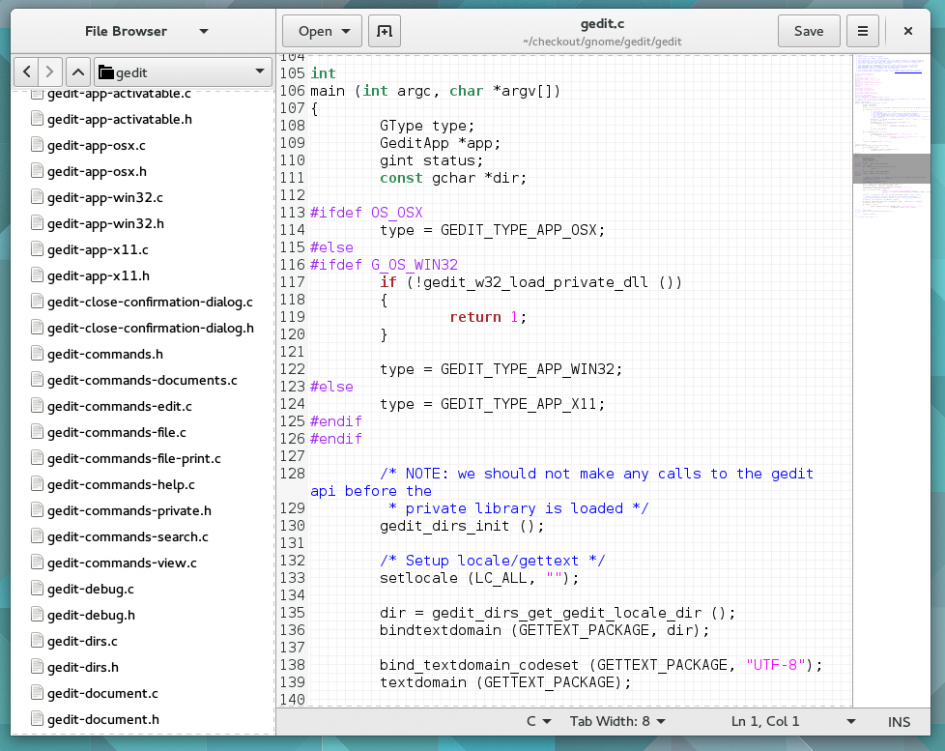


Gedit, the default GUI text editor in Fedora Workstation has a neat new minimap feature in the works. This feature provides a shrunk-down version of the document you are editing on the right of the screen to make it easier to jump between different parts of larger documents.
In a blog post announcing the new feature, gedit developer Ignacio Casal Quinteiro points out that this new feature was actually developed by Christian Hergert as part of the GNOME Builder editor, and because Christian actually made the bulk of the changes in the upstream widget, GTKSourceView, it was easy to add the same support to gedit.
It was only recently added to the gedit master branch, so this new gedit feature is likely to make an appearance in Fedora 23 Workstation.


Rene
Thats great news ! Love this simple and clean editor for doing fast changes in source code.
noone
Thank you gnome3 for all the feature-removal madness. Now, this is little more than a shopping list application…
Joe Brockmeier
That doesn’t really seem like a fair characterization at all.
Rene
Its still very basic if you’re not activating any plugins (as you seem to want it)
Marshall Neill
Sublime text already has this feature.
Joe Brockmeier
So, no other editors should implement it? 🙂
Roderick MacKenzie
I stopped using gedit and switched to pluma when the tab bar style was changed to black text on a grey background without any clear visible break between tabs. This made it hard to identify the tab I wanted and navigation between tabs too slow. I also found the removal of the title bar made using the editor slower and more cumbersome. It would be nice if Fedora focused on basic usability rather than making things look cool.
Leslie Satenstein
When it comes to editing Python, Assembly, C and C++, and shell scripts, I still prefer code-editor (its a qt editor that is directed at programmers). What I like about code-editor is the ability to reformat source code, and to highlight matching parentheses quotes, braces and more. And it’s easy to concurrently edit multiple files.
Gedit is very functional when I need to edit smaller files. It does not allow me to eliminate from view, groups of lines. Hopefully this improvement will do just that. Cuncurrent editing (cut and paste between files is most useful).
Vasilii Startcev
Oh no! That’s contrusable! I think so. Stop! Look at IntelliJ instead. Or do it in your own way. GEdit have unique style and usability solutions. This “feature” looks like something strange.
Daniel Mendez
That is a great notice, i always install sublime text for program because i love the mini-map
Fedora is awesome !