




complyctl is a powerful command-line utility implementing the principles of “ComplianceAsCode” (CaC) with high scalability and adaptability for security compliance.
In today’s rapidly evolving digital landscape, maintaining a robust security posture isn’t just a best practice – it is a necessity. For Fedora users, system administrators, and developers, ensuring that your systems meet various security and regulatory requirements can often feel like a daunting, manual task. But what if you could standardize and automate much of this process, making compliance checks faster, easier to audit, and seamlessly integrated into your workflows?
This is now a reality enabled with multiple ComplyTime projects. These focus on specific tasks designed to be easily integrated. They allow a robust, flexible, and scalable combination of microservices communicating with standardized formats that ultimately allow a powerful capability to much more easily adapt to the compliance demands. This also allow faster adoption of new technologies. There are multiple exciting projects actively and quickly evolving under the umbrella of ComplyTime organization. In this article I would like to highlight complyctl, the ComplyTime CLI for Fedora, and its main features that make it an excellent option to easily maintain a robust security posture in your Fedora systems.
complyctl is a powerful command-line utility available since Fedora 42. It’s design uses the principles of “ComplianceAsCode” (CaC) with high scalability and adaptability. It contains a technology agnostic core and is easily extended with plugins. This allows users to use the best of every available underlying technology with a simple and standardized user interface.
The Power of ComplianceAsCode with complyctl
At its heart, complyctl is a tool for performing compliance assessment activities, scaled by a flexible plugin system that allows users to perform compliance check activities with a flexible combination of the best available assessment technologies.
The complyclt plugin architecture allows quick adoption and combination of different scanner technologies. The core design is technology agnostic with standardizing inputs and outputs using machine readable formats that allow high reusability and shareability of compliance artifacts. Currently it leverages the Open Security Controls Assessment Language (OSCAL) and its anti-fragile architecture also allows a smooth adoption of future standards, making it a reliable and continuous modern solution for the long-term.
This might sound technical, but the benefits are simple:
- Automation and Speed: Traditional compliance audits can be slow, manual, complex and prone to human error. complyctl relies on standardized machine readable formats, allowing automation without technology or vendor lock-in.
- Accuracy and Consistency: Machines are inherently more consistent than human reviewers. complyctl’s reliance on OSCAL provides a standardized format for expressing security controls, assessment plans, and results. This standardization is crucial for interoperability. It allows consistent processing and understanding of compliance data across different tools and systems.
- Scalability and Integration: complyctl simplifies compliance checks integration in your development and deployment pipelines. An OSCAL Assessment Plan can be created and customized once and reused across multiple systems. Ultimately compliance checks can be implemented faster and compliance gaps are caught earlier. This prevents non-compliant configurations from reaching production environments.
- Extensibility with Plugins (including OpenSCAP): The plugin-based architecture of complyctl makes it incredibly versatile. An example is the complyctl-openscap-plugin, which extends complyctl’s capabilities to use OpenSCAP Scanner and the rich content provided by scap-security-guide package. This allows an immediate and smooth adoption of complyctl using a well-established assessment engine while providing a modern, OSCAL-driven workflow for managing and executing security compliance checks. It also allows a smooth and gradual transition to other scanner technologies.
By embracing complyctl, Fedora users can more easily maintain a strong security posture.
Getting Started with complyctl: A Practical Tutorial
Ready to put complyctl to work? It is likely simpler than you expect. The following is a step-by-step guide to start using complyctl on your Fedora system.
1. Installation
First, install complyctl, if necessary. It is available as an RPM package in official repositories:
sudo dnf install complyctl
2. Understanding the Workflow
complyctl follows a logical, sequential workflow:
- list: Discover available compliance frameworks.
- plan: Create an OSCAL Assessment Plan based on a chosen framework. This plan acts as your assessment configuration.
- generate: Generate executable policy artifacts for each installed plugin based on the OSCAL Assessment Plan.
- scan: Call the installed plugins to scan the system using their respective policies and finally aggregate the results in a single OSCAL Assessment Results file.
Let’s walk through these commands.
3. Step-by-Step Tutorial
Step 1: List Available Frameworks
To begin, you need to know which compliance frameworks complyctl can assess your system against. Currently the complyctl package includes the CUSP Profile out-of-the-box.
Use the list command to show the available frameworks:
complyctl list
This command will output a table, showing the available frameworks. Look for the Framework ID column, as you’ll need this for the next step.
Example:
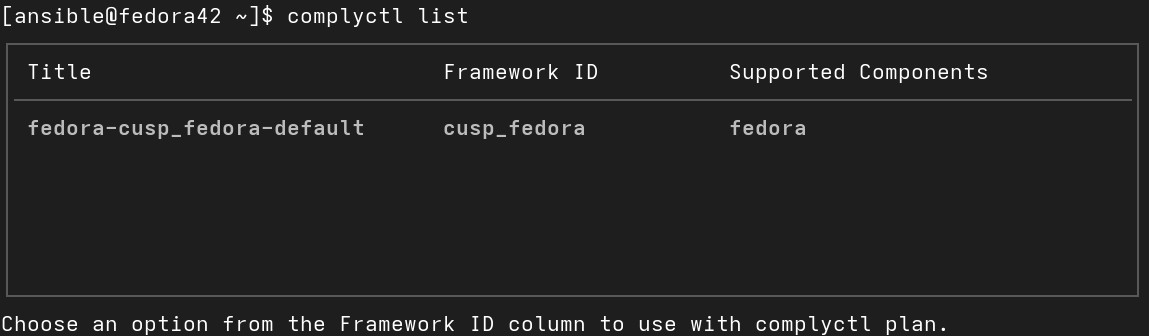
Optionally, you can also include the --plain option for simplified output.
Step 2: Create an Assessment Plan
Once you’ve identified a Framework ID, you can create an OSCAL Assessment Plan. This plan defines what will be assessed. The plan command will generate an assessment-plan.json file in the complytime directory.
complyctl plan cusp_fedora
This command creates the user workspace in the “complytime” directory:
tree complytime
complytime/
└── assessment-plan.json
The JSON file is a machine-readable representation of your chosen compliance policy.
Step 3: Install a plugin
In this tutorial we will use OpenSCAP Scanner as the underlying technology for compliance checks. So, we also want to install the OpenSCAP plugin for complyctl as well the OpenSCAP content delivered by scap-security-guide package:
sudo dnf install complyctl-openscap-plugin scap-security-guide
Step 4: Generate Policy Artifacts
With your assessment-plan.json in place, and the desired plugins installed, the generate command translates this declarative plan into policy artifacts for the installed plugins. These are the actual plugin specific instructions complyctl plugins will use to perform the checks.
complyctl generate
This command prepares the assessment for execution.
tree complytime/

complytime/
├── assessment-plan.json
└── openscap
    ├── policy
    │   └── tailoring_policy.xml
    ├── remediations
    │   ├── remediation-blueprint.toml
    │   ├── remediation-playbook.yml
    │   └── remediation-script.sh
    └── results
Step 5: Execute the Compliance Scan
Finally, the scan command runs the assessment using the installed plugins. The results will appear in the assessment-results.json, file by default.
complyctl scan
For human-readable output, which is useful for review and reporting, you can add the --with-md option. This will generate both assessment-results.json and assessment-results.md files.
complyctl scan --with-md
This Markdown file provides a clear, digestible summary of your system’s compliance status, making it easy to share with auditors or other stakeholders.
tree complytime/
complytime/
├── assessment-plan.json
├── assessment-results.json
├── assessment-results.md
└── openscap
    ├── policy
    │   └── tailoring_policy.xml
    ├── remediations
    │   ├── remediation-blueprint.toml
    │   ├── remediation-playbook.yml
    │   └── remediation-script.sh
    └── results
        ├── arf.xml
        └── results.xml
Final thoughts
complyctl is an open-source tool built for and by the community. We encourage you to give it a try.
- Find us on GitHub at complyctl repository.
- If you find an issue or have a feature request, please open an issue, propose a PR, or contact the maintainers. Your feedback will help shape the future of this tool.
- Collaboration on ComplianceAsCode/content community is also welcome to help us shaping Compliance profiles for Fedora.


Olav Vitters
There’s a typo: necessasry
Gregory Bartholomew
Thanks. It’s been corrected.
Steven
Am I correct in surmising that this is a wrapper around openscap/ssg, and makes leveraging the scan/remediate/reporting components? Great article, thank you!
Marcus Burghardt
Thanks, Steven. That perception isn’t wrong. But considering the plugin architecture, we can essentially use any available scanner technology besides OpenSCAP/SSG. We can even combine multiple scanner technologies in a single assessment without affecting the user interface and the standardized formats used by complyctl. This allows us to adopt, retire, or migrate scanner technologies much more easily and quickly, always using the best available.
sarahyard
Thank you for sharing this detailed guide! complyctl looks like a powerful tool for automating compliance checks in Fedora. I appreciate the clear step-by-step instructions for installation, creating assessment plans, and running scans with OpenSCAP. The plugin-based architecture and OSCAL support make it flexible and scalable for various environments. I’m excited to try it out and see how it can simplify compliance management on my systems.
Yard House Menu
Great breakdown of complyctl and its benefits—automation and OSCAL-driven workflows are definitely the future of compliance management. Tools like this show how important it is to balance security with usability. On a different note, for those interested in food industry insights, you can also check resources like the Yard House Menu Visit: ( https://yardhousemenu.us/ ) for practical comparisons on consumer transparency.